My development environment 2026
This is a translated version of my Japanese blog post.
Machine, OS
I’ve been using macOS for quite a while. I don’t remember exactly when I started, but I think it’s been almost 10 years.
I’m also interested in Linux, and I bought an old ThinkPad and installed Ubuntu on it. But since my company provides a MacBook and I’m busy with childcare, I don’t want to spend the effort to stay productive on both OSes, so I stick with a MacBook. I have little to complain about so far.
Recently, I bought an M5 MacBook Pro for personal use (upgrading from an M1 MacBook Air). Space Black looks pretty cool.
Editor
I’ve loved JetBrains IDEs for their rich features, to the point that I jokingly call myself an “unofficial JetBrains ambassador”. However, I switched to the VS Code ecosystem when the AI coding wave arrived.
Still, I’m less satisfied with them than with JetBrains IDEs (especially for Ruby; RubyMine is incredibly powerful). Now that CLI tools like Claude Code and Codex are in full swing, I’m starting to think it might make sense to use JetBrains IDEs again as supporting tools. That said, it’s hard to beat VS Code being free…
I don’t want to juggle different keyboard shortcuts across tools, so I’d like to settle on a single editor eventually.
Coding Agent
I use Claude Code for implementation, and Codex for reviews and debugging.
I used to use Codex for planning as well, but after trying the Thariq-style planning method, I’m considering using Claude Code for planning too.
I feel each tool has its own strengths and weaknesses, so I try not to get too attached to any single one.
I use Cursor too, but subscription costs were adding up, so I’ve canceled it for personal use.
Terminal Emulator
My main terminal emulator is Ghostty. I also happened to join the Japanese translation team. Its native UI is beautiful, and it’s really fast. Development is very active, too. My config is only three lines.
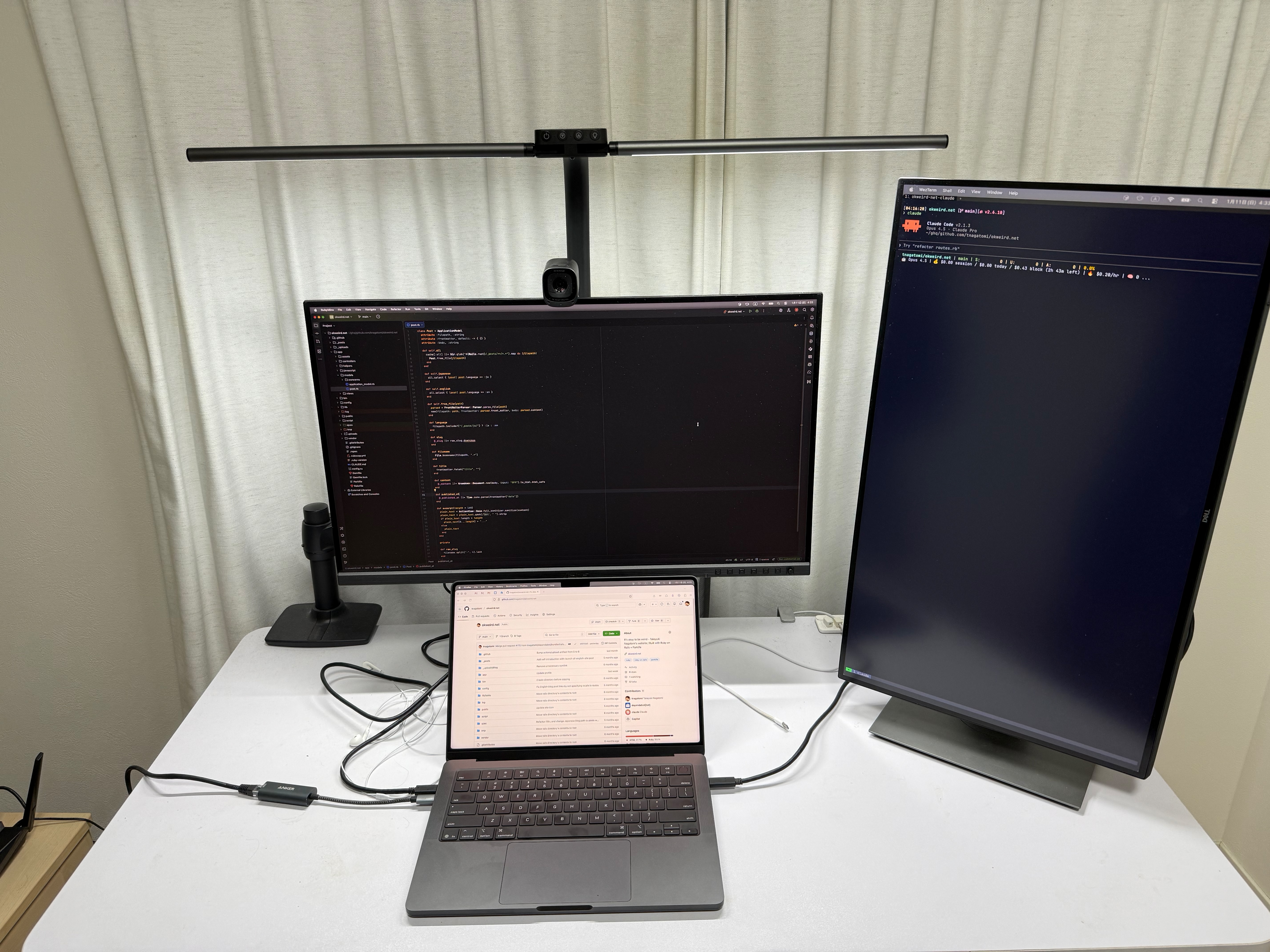
I also use WezTerm exclusively for agent CLI tools. I dedicate a portrait external monitor to it (making a triple-monitor setup with another landscape monitor and the MacBook’s built-in display).
I use a portrait monitor because agent chats tend to get long. If you run four or more panes side by side, a landscape monitor might be better.
Terminal multiplexer
I’ve been using tmux for a long time. I’ve tried Zellij, but tmux feels more minimal to me. I like being able to select windows with number keys, and it’s easier to copy text with the keyboard (though those may be possible in Zellij now via updates or plugins).
I create a Ghostty tab per project, and then separate things into windows for backend, frontend, and so on.
I haven’t fully learned how to use it to orchestrate my agent CLI tools, so I’d like to get better at that.
Shell
I use zsh. I used fish for a while, but I came back to zsh because of its bash compatibility. I use Starship for my prompt.
CLI tools
I rely on these tools a lot:
- gh
- ghq
- git-wt
- fzf
- mise
Launcher
I’m using Raycast. With Karabiner-Elements, I map the right Command key to Hyper, and launch applications with Right Command + a letter key.
I also use clipboard history, snippets, window management features a lot. Emoji search is surprisingly handy 😄
Font
I use UDEV Gothic 35NF, which includes Japanese glyphs. I’m not particularly picky about fonts, so I’m happy with it.
Browser
My main browser is Firefox. There have been some AI-related issues recently, but overall I’m very satisfied.
I tried Orion, but it didn’t have enough features for me. I’m rooting for Kagi, though. I’m also curious about Ladybird.
Note taking
I’m using Obsidian. As a local-first app, it pairs really well with tools like Claude Code, which makes it incredibly powerful for me right now. I also used Notion as a personal database, but with the release of Bases, I decided to consolidate everything into Obsidian, with some help from Claude Code. The migration was easy with Claude Code.
Keyboard, Pointing Device
I’m using my MacBook’s keyboard and trackpad. I like the minimalism, and I used to think typing isn’t actually that big a part of programming. But now that I chat with agents much more, I type a lot more too, so I’m reconsidering.
Conclusion
This is my development environment as of January 2026.
Another thing worth mentioning is that I don’t customize my setup much, and I try to stay close to the defaults. When I bought my M5 MacBook Pro, I rebuilt everything from scratch, but the migration was pretty easy.
My dotfiles are public, so feel free to take a look if you’re interested: https://github.com/tnagatomi/dotfiles